LuperIQ RestaurantMenus, ordering & reservations Start free
Website, ordering, reservations and back-of-house for independent restaurants

One site, front of house to back.

Your menu, your online ordering — pickup, delivery, a table order, or a treat bought for another table — paid by card straight into your own Stripe account. Reservations and a live table board out front; pantry, food cost and the schedule behind the pass. No commission on a single ticket.

7-day free trial · no credit card · live in about 15 minutes
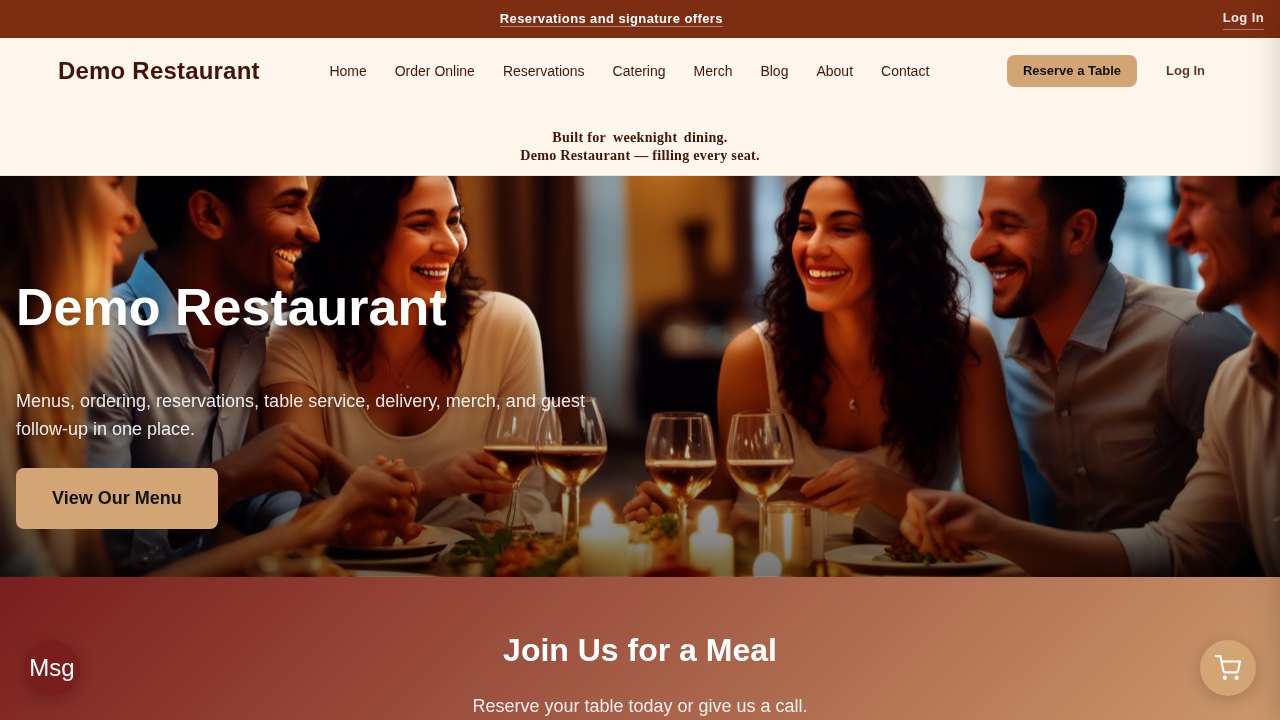
The home page of a live restaurant site built on LuperIQ, with a menu link and a reserve-a-table button

Built for the room you actually run

One owner-operator and a small group with catering on the side need the same menu, the same cart and the same schedule — so it is one site type, not two products.

One room, and it's yours

You own a single restaurant — a dining room, a counter, or both. You cook, you run the floor some nights, and the website is whatever somebody built you three years ago.

  • Taking your own online orders instead of handing a cut of every ticket to somebody else
  • A menu you can change yourself when the fish changes, without emailing a web guy
  • Reservations that respect your real rules — party size, lead time, how far out you'll book
  • Knowing what a plate actually costs you before you price it

Your menu, your ordering and your reservations on your own site and your own Stripe account — and a pantry and food-cost view behind it so pricing is a number, not a guess.

A second room, and catering on the side

You run two or three rooms — or one room plus the events and trays that pay for the slow weeks — and you are the person who ends up holding every schedule and every order.

  • Running each room's menu, ordering and reservations without three separate logins to three separate products
  • Getting the schedule out, the shifts covered and the tip pool split without a spreadsheet
  • Keeping delivery inside the ZIPs you can actually reach, instead of turning a driver around at the door
  • Catering enquiries that arrive as voicemail and get chased by phone

One console for the room: menu, orders, tables, pantry, schedule and tip pooling — with catering arriving as an enquiry today and bookable quotes on the roadmap.

Take a look around

Three pages from a live restaurant site running on this platform, exactly as a guest sees them.

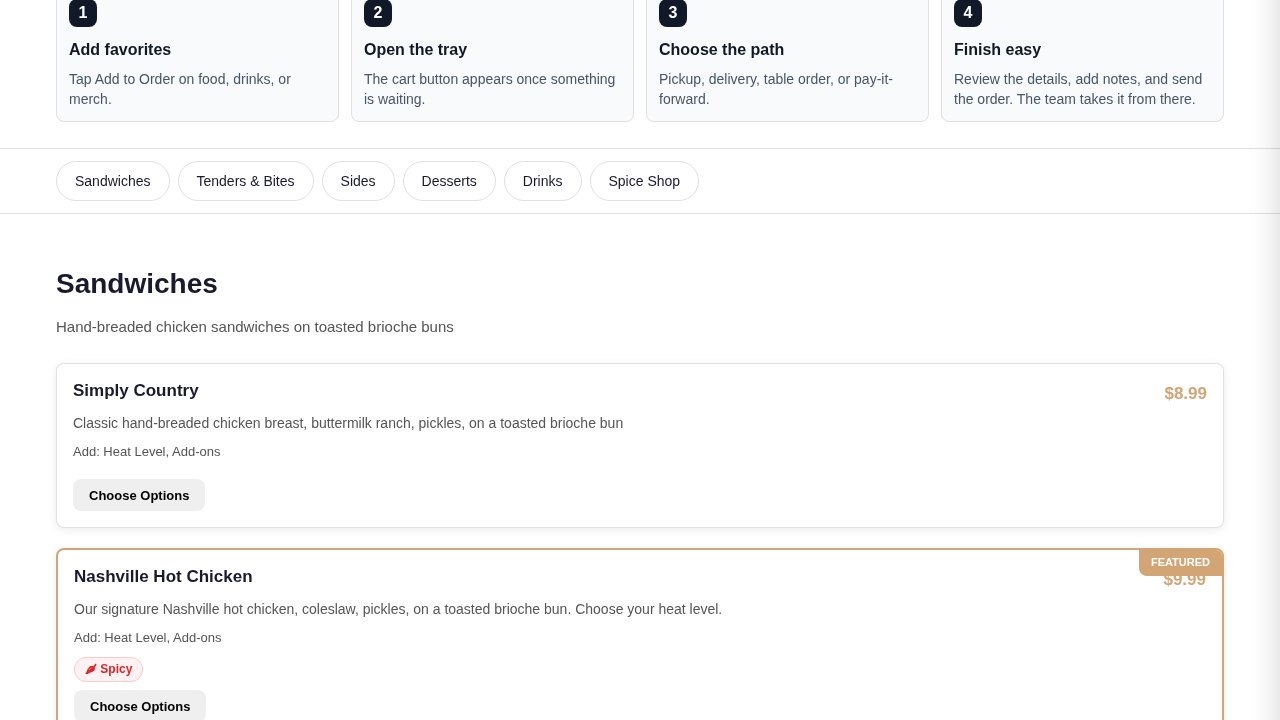
A restaurant menu page with categories, dish descriptions, prices, options and a featured dish

The menu, exactly as you serve it

Categories across the top, dishes with descriptions and prices, add-ons and heat levels behind Choose Options, and a Featured badge on the one you want ordered.

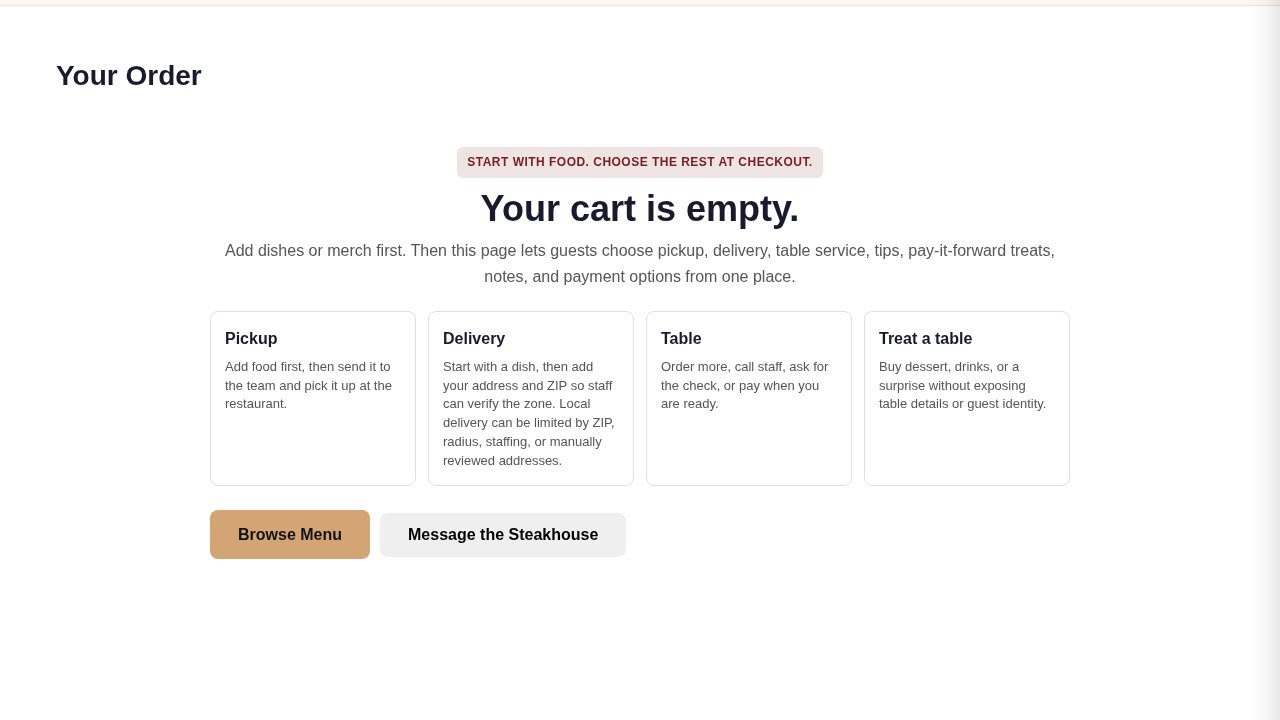
The order page showing four fulfilment paths: pickup, delivery, table and treat a table

One cart, four ways to serve it

Pickup, delivery inside your own ZIP zone, a dine-in order sent from the table, or a pay-it-forward treat bought for someone else's table — all from the same cart.

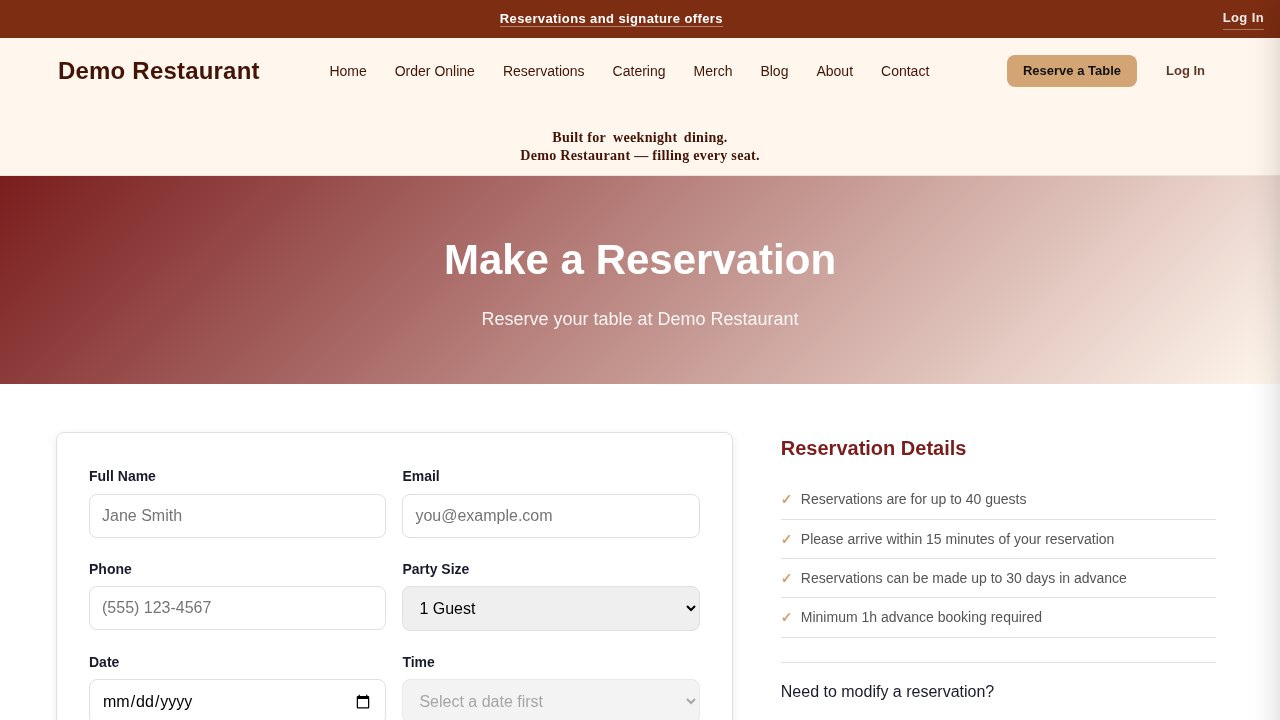
A reservation form with party size, date and time slots, beside the restaurant's booking rules

Reservations on your rules

Party size, date and the time slots you actually have — with your maximum party, your advance notice and how far ahead you'll book stated right beside the form.

What's in the box today

Everything marked now is running on the demo you can click through above. Anything marked coming is on the roadmap and not something you should count on yet.

Now

Your menu, the way you serve it

Categories, dishes, descriptions, prices and photos, with option groups and add-ons behind each item, featured dishes, and allergen and dietary disclosures kept beside the food they belong to.

Now

Ordering with four paths in one cart

A guest adds food, then picks the path at checkout: pickup, delivery, a dine-in order from the table, or a pay-it-forward treat for another table. One cart, one flow, no second app.

Now

Card payment into your own Stripe

Guests pay you, through your own Stripe account, on your own site. There is no platform commission on any ticket — the subscription is the whole bill.

Now

Delivery inside the zone you set

Accept delivery only for the ZIP codes you allow. An address outside the zone is turned down at checkout with an explanation, instead of at the door forty minutes later.

Now

Reservations with real time slots

Guests book by party size, date and an actual open slot — built from your maximum party, your minimum advance notice and how far ahead you take bookings. Confirm or decline from the admin.

Now

A table board for the floor

Tables, table sessions and table status in one board, plus guest requests sent from the table, so the room knows what is seated, what is waiting and what needs running.

Now

Sales tax on every online ticket

Set your combined rate once and it is applied to the food on every online order and shown to the guest before they pay, alongside your service charge and their tip.

Now

Pantry, prep recipes and food cost

Kitchen inventory by zone, prep recipes built from it, a reorder list when stock runs down, and a cost rollup that puts a real food-cost percentage beside each menu price.

Now

Scheduling, shifts and the tip pool

Build the schedule, track shifts and time entries, and split pooled tips by the points you set — with a payroll summary you can hand to whoever runs payroll.

Now

Reviews tied to the dish

A guest reviews the item they actually ordered, and nothing publishes until you approve it — so the menu page carries real feedback rather than whatever the internet felt like saying.

Now

Specials and guest follow-up

Run a special, keep a guest profile with the birthday or anniversary a guest chose to give you, and follow up after the visit instead of hoping they come back.

Coming

Catering quotes and event booking

Today the catering page states your headcount minimum and lead time and sends the enquiry to you. Quoting an event, taking a deposit and putting it on the calendar are on the roadmap.
Sales tax on the ticket

Texas charges state sales tax on prepared food, and your local taxing jurisdictions can add their own on top — but only up to a fixed ceiling. Set your combined rate once and every online ticket computes it for you:

Alcohol is taxed on its own returns and is not calculated here. The Comptroller charges a mixed beverage permittee 6.7% mixed beverage gross receipts tax on alcohol sales, and a separate 8.25% mixed beverage sales tax on the drink itself. Set your food rate on this site and leave the bar's returns where your accountant already files them. Rates and rules: the Texas Comptroller, comptroller.texas.gov.

6.25% Texas state sales tax on prepared food
+ up to 2% city, county, transit and special-purpose district tax
= 8.25% maximum combined rate anywhere in Texas
Applied to the food and shown on the ticket before the guest pays

Live in about 15 minutes

The signup wizard gets the site up. The parts that need your real numbers wait for the admin, where they can actually be applied.

1

Tell us about the restaurant

Your name, your town and what kind of room it is. The site is built with a menu page, an ordering page, reservations, catering, merch, a blog and the usual about and contact pages already in place.

2

Load the menu

Categories first, then dishes with prices, descriptions and any option groups — heat levels, add-ons, sides. This is the part worth doing properly; everything else on the site points at it.

3

Set the rules under Admin → Restaurant

Your sales-tax rate, service charge, delivery ZIP zones, reservation limits and hours. The signup wizard does not ask for these because nothing would apply them yet.

4

Connect your Stripe and take the first order

Link your own Stripe account, put a test order through the cart end to end, and you are taking real ones.

Start Free — 7 Days, No Card

Why I built this

I've spent 30-plus years in pest control, not in a kitchen. I built LuperIQ because the software small operators get stuck with is either bloated or an afterthought, and I figured a guy who wrote his own OS as a first Rust project could do better.

Restaurants run on the same engine as everything else here — a catalog, a cart, real card payments, bookings, staff scheduling, inventory. What the restaurant module adds is the part that is specific to a room: the four ways a ticket can be fulfilled, the table board, prep recipes and what a plate costs you.

I'd rather tell you what this is not. It is not a POS terminal, it does not dispatch drivers, and there is no points programme. It is your own website, your own ordering, your own reservations and the back-of-house numbers behind them — without a percentage coming off every ticket.

— Dave, founder of LuperIQ

See it running, not a screenshot

There is a live restaurant site on this exact platform — a real menu with option groups and prices, the four-path cart, a reservation form with working time slots, and the catering and merch pages that come with it. Browse the menu, open the cart, book a table.

Open the live restaurant demo →
A restaurant menu page with categories, dish descriptions, prices, options and a featured dish

Questions owners actually ask

Do you take a percentage of my orders?

No. You pay a flat subscription for the platform. Every order runs through your own Stripe account, your guests are your guests, and nothing is skimmed off a ticket — whether it is a $9 sandwich or a $400 table.

Is this a point-of-sale system?

No, and it is worth being blunt about it. There is no terminal, no cash drawer, no card reader and no end-of-night close. This is your website, your online ordering, your reservations and the back-of-house numbers behind them. Whatever you ring the room up on stays where it is.

Can I do delivery?

You can take delivery orders, and you control which ZIP codes are inside your zone — an address outside it is refused at checkout with a note to pick up instead. What the product does not do is dispatch: there is no driver app and no routing. Delivery is you, your staff, or whoever you already use.

What is a pay-it-forward order?

A guest buys dessert, a drink or a surprise for another table — one they name, or one you pick. The recipient's table details and identity are never exposed to the buyer, and you can require the recipient to accept before it lands. It is opt-in per restaurant, off unless you turn it on.

How does the sales tax work?

You set one combined rate — 6.25% Texas state plus your local jurisdictions, up to the 8.25% ceiling — and it is applied to the food on every online ticket and shown before the guest pays. Alcohol is a separate matter: the mixed beverage taxes are filed on their own returns and this site does not calculate them.

Can guests book a table themselves?

Yes. They pick party size, date and a real open time slot, built from your maximum party size, your minimum advance notice and how far ahead you take bookings. You confirm or decline from the admin, and the floor sees it on the table board.

I already take orders through the big ordering apps — do I have to stop?

No. Keep whatever is already working. This is your own ordering channel sitting alongside it, on your own address and your own Stripe account, where nothing comes off the top. Most operators start by pointing regulars at it and leave the rest alone.

Is there a loyalty or points programme?

Not today, and the page will say so until there is. What exists is a guest profile — the birthday or anniversary a guest chose to hand you, and their order history — plus specials and post-visit follow-up. Points and rewards are not built.

How fast can I actually get live?

About 15 minutes to answer the setup questions and connect Stripe. Loading the menu properly takes longer than everything else combined, and your tax rate, delivery zone and reservation rules are set right after, under Admin → Restaurant.

One flat plan, no percentage of your tickets

Restaurant runs on LuperIQ's Business plan — every module, every page type, unlocked from day one, whether it is one room or three.

  • $99.95/month, or $799/year
  • $2,397 once, lifetime — no subscription, ever again
  • 7-day free trial, every feature unlocked, no credit card to start
  • 5 staff seats included; add seats as the team grows
  • 5 GB storage, unmetered visitors, your own domain, no LuperIQ branding
  • No commission on orders — the subscription is the whole bill

Take your own orders, on your own site

One room or three — start free, load a few dishes, and put a real order through the cart before you decide.

Start Free — 7 Days, No Card